
Bear Eraser
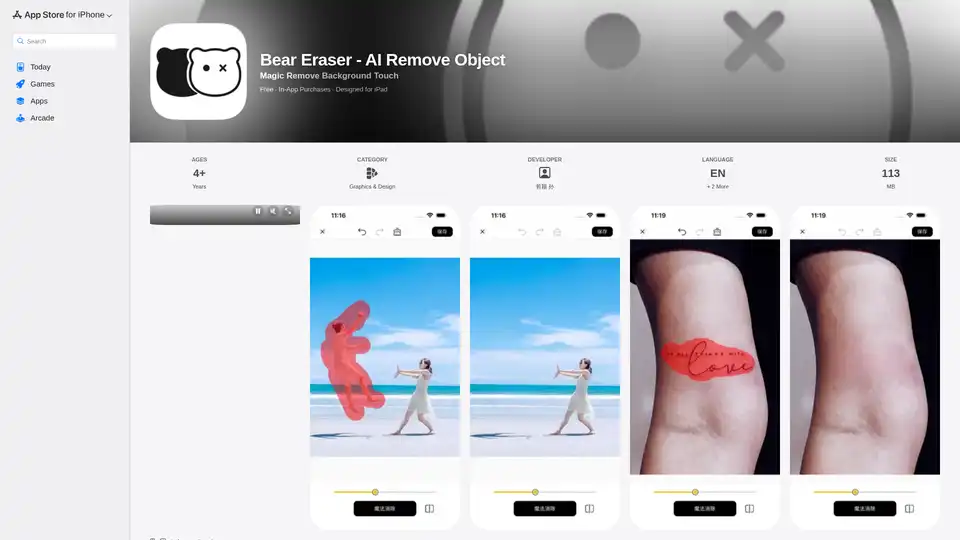
Overview of Bear Eraser
Bear Eraser: Effortless AI-Powered Photo Editing
What is Bear Eraser?
Bear Eraser is an innovative app designed to seamlessly remove unwanted objects from your photos using the power of AI. Leveraging Apple's CoreML technology, this app ensures complete user privacy by processing images directly on your device without any network requests or servers.
Key Features:
- Seamless Restoration: Utilizes intelligent reconstruction algorithms to cleverly rebuild missing or damaged areas while removing objects, achieving perfect seamless restoration of images.
- Versatile Use: Ideal for removing bystanders, tattoos, billboards, sensitive information, and more from your photos.
- Privacy Focused: Processes images locally using Apple CoreML, ensuring complete protection of user photo privacy.
- User-Friendly: Easy to use interface allows you to effortlessly eliminate unwanted elements from photos while maintaining their integrity and aesthetic appeal.
How to Remove Objects with Bear Eraser?
- Open the Bear Eraser app on your iPhone or iPad.
- Import the photo you want to edit.
- Use the touch tool to highlight the object you want to remove.
- Let the AI algorithms seamlessly remove the object and restore the background.
- Save your edited photo.
Why is Bear Eraser Important?
Bear Eraser is important because it allows you to:
- Enhance Your Photos: Remove distractions and flaws to showcase the best version of your memories.
- Protect Your Privacy: Edit your photos locally without sending them to external servers.
- Unleash Your Creativity: Experiment with removing different elements to create unique and visually appealing images.
Where Can I Use Bear Eraser?
You can use Bear Eraser on your:
- iPhone
- iPad
- Mac (with Apple M1 chip or later)
- Apple Vision
Best way to Enhance your photos?
The best way to enhance your photos with Bear Eraser is to experiment with different object removal techniques and use the app's intelligent reconstruction algorithms to achieve seamless and natural-looking results.
Customer Reviews
Users have praised Bear Eraser for its ease of use, effective object removal capabilities, and commitment to user privacy.
FAQ
Q: Does Bear Eraser require an internet connection? A: No, Bear Eraser processes images locally using Apple CoreML and does not require an internet connection.
Q: Is Bear Eraser free to use? A: Bear Eraser is free to download and use, but it offers in-app purchases for additional features.
Q: What types of objects can I remove with Bear Eraser? A: You can remove bystanders, tattoos, billboards, sensitive information, and more from your photos.
Download Bear Eraser now and transform your photos into masterpieces!
AI Generated Art Image Enhancement and Repair Image Style Transfer AI Background Removal and Replacement AI Avatar and Cartoonization 3D Modeling and Rendering Logo and UI Design
Best Alternative Tools to "Bear Eraser"

PixZap lets you edit photos via WhatsApp using AI. No app needed! Just send a photo and your edit request to PixZap for quick changes like object removal, style transfer, and more.
Enhance your images with Imagewith.AI, the best AI image generator and online photo editor. Upscale, remove backgrounds, erase objects, and more. Try it now and witness the magic!

Generate images from existing ones for free using AI Image to Image tech. Just edit any photo with a prompt to transform instantly.

Imagewith.AI is an AI image editor that enhances images, removes backgrounds, and more. Try it now and witness the magic.